A campus can be inspiring — and overwhelming.
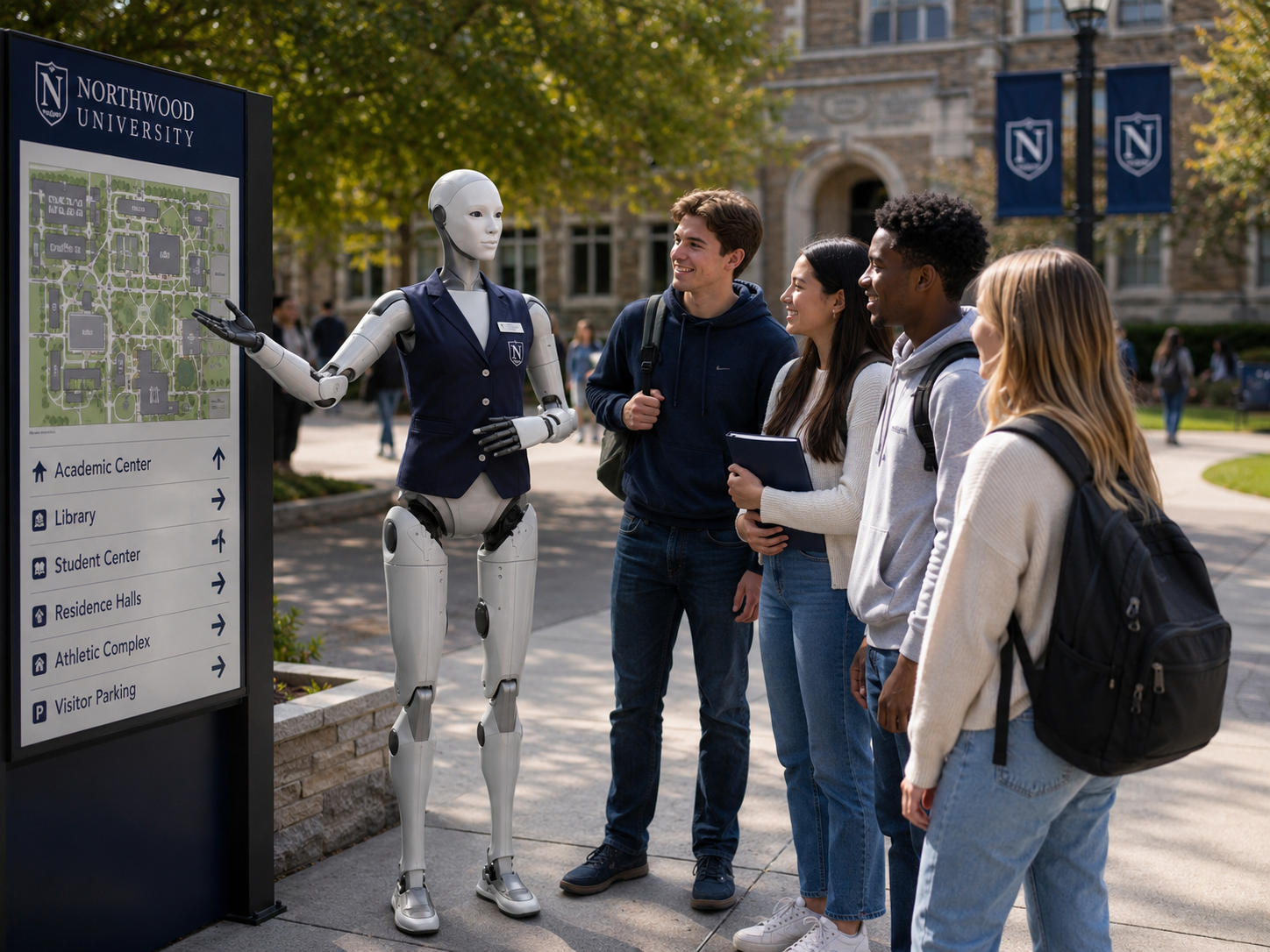
A prospective student or first-time visitor may arrive with dozens of questions: Where is the admissions office? Which building houses my program? Where is today's open house registration? How do I speak with an academic advisor? The Campus Guide gives people a visible and approachable place to begin.
It can help reduce confusion, introduce the institution, direct visitors, explain approved information, and help university teams manage high-volume events more effectively. For students, it creates a memorable interaction with emerging technology. For institutions, it demonstrates innovation in a way people can experience directly.
Six capabilities across the campus visitor journey.
Every deployment is customized around the institution, audience, campus environment, approved information, privacy requirements, event objectives, and selected humanoid platform.
Greet every visitor with a relevant opening.
The Campus Guide can greet people entering a visitor centre, open house, faculty building, innovation showcase, or designated campus area. Greetings may be adapted according to institution name, event, faculty, visitor type, time of day, preferred language, campus culture, and level of formality.
"Welcome to the Northern Institute of Technology. Are you here for today's open house, visiting a specific faculty, or looking for campus information?"
Share approved academic program information.
The robot can explain program names, fields of study, general structure, degree or diploma types, faculty descriptions, typical areas of learning, program duration, publicly available admission requirements, application timelines, co-op opportunities, research areas, and career pathways described by the institution.
"The software engineering program focuses on programming, systems design, data structures, and software development. For an evaluation of your specific academic background, the admissions team will need to review your application."
Help prospective students explore the differences between programs.
Prospective students often know the subject they enjoy but not which program fits. The Campus Guide can explain approved distinctions — computer science versus software engineering, marketing versus business administration, undergraduate versus graduate study — without making the final academic choice for the student.
"Computer science may place greater emphasis on computation and software theory, while software engineering generally focuses more heavily on designing and managing large software systems. An academic advisor can help you compare the specific course plans."
Direct visitors across a large campus.
The Campus Guide can help visitors locate admissions, registrar, faculties, departments, classrooms, libraries, laboratories, student services, residence offices, dining, washrooms, accessible entrances, elevators, parking, health services, and event registration. It may point, explain a route, display a map, present a QR code, or request a human guide.
Support open houses and high-volume recruitment events.
During a busy open house, the robot can help answer repeatable questions while admissions teams focus on individual conversations. It can welcome students, explain the event schedule, direct visitors to faculties, introduce presentations, provide tour information, answer common admissions questions, and provide bilingual assistance.
Direct people to the human professionals they need.
The Campus Guide should understand when human expertise is required. It can direct visitors toward admissions representatives, academic advisors, faculty members, student ambassadors, international student services, accessibility services, financial aid, career services, campus security, and counselling.
"I can explain the public admission requirements, but an admissions advisor will need to review whether your previous studies meet the program requirements."
The Campus Guide supports the informational first layer — not the decisions that shape a student's future.
Choosing a program, beginning university, or asking for support can involve major personal decisions. Its purpose is to help people find the institution's human expertise more easily — not place another layer between students and support.
The robot can support
Human professionals remain responsible for
From curiosity to the right academic conversation.
A prospective student exploring computer programs — the robot helps them become more informed without replacing the academic advisor.
A family arrives at an open house
A prospective student approaches the robot near the main registration area.
Campus Guide welcomes them
Student responds
Robot asks a useful question
Student explains
Robot provides approved guidance
Student asks what to do next
Robot directs them
Student asks for directions
The robot displays or explains the approved route. The interaction has helped the student become more informed without replacing the academic advisor.
Three types of campus information — each handled differently.
A strong initial pilot does not require access to student records. Approved public and institutional information is sufficient to create real value for visitors.
Reliable for immediate answer. Rarely changes during the deployment.
Requires a reliable update source or event-specific configuration.
Not accessible in an early pilot. Any future use requires strict security, identity verification, permissions, and privacy controls.
Nine visitor types. One consistent campus experience.
Prospective students
Programs, admissions, tours, student life, and faculty information.
Families
Presentations, services, parking, dining, and support resources.
Current students
Services, events, buildings, offices, and general campus resources.
International visitors
Bilingual or multilingual guidance and international support referrals.
Alumni
Events, departments, reunions, development offices, and campus changes.
Industry partners
Research centres, collaboration opportunities, innovation programs.
Donors
Approved institutional initiatives, events, facilities, and impact stories.
School groups
Robotics experiences, age-appropriate campus information, and structured tours.
Conference attendees
Registration, schedules, rooms, dining, transportation, and event information.
Seven roles across the campus experience.
The same archetype can be reconfigured for different institutional events, audiences, and objectives throughout the academic year.
Open House Guide
Welcomes prospective students and families during major recruitment events.
Visitor Centre Guide
Provides general campus information throughout the academic year.
Orientation Guide
Supports new students during the beginning of a semester.
Faculty Guide
Configured for one faculty, department, or academic building.
Research Showcase Guide
Explains selected projects and helps visitors explore an innovation event.
Campus Event Guide
Configured for a conference, alumni event, convocation, or public program.
Student Services Guide
Introduces available services and directs students to the correct office.
A clear boundary between general information and individual assessment.
The robot may provide
It should not
Appropriate language
"The published requirement is available here, but the admissions team will need to assess your specific academic background."
Begin with controlled information. Expand deliberately.
A strong initial pilot does not require access to student records. Public program, map, event, and service information is sufficient to create substantial value for visitors and admissions teams.
Public campus information
The robot answers questions using approved program, map, event, and service information.
Current events and wayfinding
The robot receives updated schedules, rooms, closures, and campus announcements.
Appointments and visitor workflows
The robot may help book a tour, admissions conversation, or information session.
Authenticated student services
Selected personal services may be considered only where identity, cybersecurity, privacy, accessibility, and institutional governance have been fully addressed.
Campus environments may include children, students, and personal educational information.
The Campus Guide should begin with conservative privacy practices. The robot should never ask a child or prospective student for unnecessary personal details. Where follow-up is requested, an approved institutional form or human representative should handle the process.
Privacy principles
A campus guide should help make the institution easier to navigate for everyone.
Accessibility information must be validated by the institution. The robot should not assume that the shortest route is the appropriate accessible route.
Campus spaces are busy, varied, and unpredictable.
Large crowds, children, backpacks, mobility devices, stairs, glass walls, narrow corridors, temporary event displays, and changing room layouts are all part of a live campus environment. For an initial pilot, the robot should usually remain in a controlled indoor location such as a visitor centre, lobby, atrium, faculty entrance, or event registration area.
Understand how visitors actually experience your institution.
These insights can improve more than the robot. If hundreds of visitors cannot find the same faculty building, the institution may need better signs, maps, confirmation emails, or event communications — not more robot responses.
Example campus insights
Visitor interactions
Approximate count, peak periods, average duration, preferred languages, repeat questions
Most requested programs
Academic interest patterns, frequently compared programs, common admissions questions
Common destinations
Most requested buildings and services; navigation difficulties and accessible-route requests
Preferred languages
English, French, or other language selections and bilingual interaction patterns
Service referrals
Most requested student services, human escalations, and international student inquiries
Recurring questions
Topics the robot could not answer or frequently escalated — revealing content or signage gaps
Ten steps from institutional review to pilot improvement.
HumanoidX defines a clear role, environment, personality, task set, safety framework, supervision model, and measurable objective before deployment — rather than leaving institutions to independently solve configuration, knowledge, safety, and support.
Understand the institution
Review the campus, audience, programs, events, visitor journeys, support services, privacy requirements, and strategic objectives.
Select a focused first role
A strong initial pilot may focus on open-house welcome, visitor-centre information, faculty showcase, orientation, research event, or campus wayfinding.
Define the robot's boundaries
Determine what the robot may explain, what information it may access, and when it should direct someone to a human professional.
Prepare approved knowledge
The institution supplies or validates program information, maps, events, services, and frequently asked questions.
Design the visitor journey
Map the interaction from greeting through information, direction, booking, or human handoff.
Assess the environment
Review flooring, traffic, lighting, power, connectivity, accessibility, operating zones, transportation, and safety.
Configure the experience
Develop the personality, languages, answers, directions, announcements, and escalation rules.
Test realistic scenarios
Test with program comparisons, admissions questions, accessibility routes, international visitors, child interactions, personal-record requests, event changes, unknown questions, and network interruptions.
Launch a managed pilot
The robot operates for a defined period with institutional support, human oversight, and measurable objectives.
Review and improve
Evaluate visitor engagement, recurring questions, student response, staff feedback, technical reliability, and expansion opportunities.
Six focused, measurable starting points.
Each pilot targets one clearly defined campus context so performance can be evaluated honestly and used to plan the next phase.